
In both cases insert a stairwell in the upper level zone.
For stairs or a void that is not the full floor area of the upper floor zone, enter the area (m^2) of the opening for the stairwell.
A room that extends to the height of two levels should be modelled as a separate zone on each level, with the top level being modelled as a conditioned zone. A stair well should be modelled between the two zones. The area of the stairwell should be the same as the floor area. The zone type selections should be made as per the NatHERS zoning guidelines.
Please note: Stairs should not be modelled separately unless there is a door that isolates them from the zones they connect to.
Double height spaces (Chenath 3.21)
A new feature - double height spaces. Use an example two storey house used in training.


Steps
- Draw lower level zone/s
- Draw upper level zone - “Unconditioned”
- Select “Insert Stairwell” in upper level zone and click in this zone
- Select “Double Height Void”
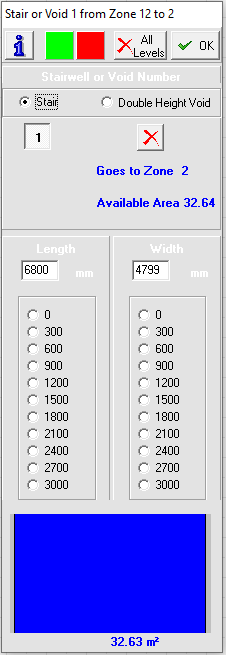
The whole area of the selected zone is now connected to the lower level as a double height space. Recessed lights (downlights), ceiling fans etc. are added to the upper level zone (if present) via the “Airflow” button as required.


NB. You can have multiple upper level zones over a single lower level zone but you cannot have a single upper level zone over multiple lower level zones.
